
What Does it Mean to “Optimize Ingest”?
Security information and events management (SIEM) tools revolve entirely around data. The whole point is to aggregate your logs and events into a centralized repository to gather insights, take action, or serve other use cases. However, data stacks up. Quickly. Optimizing your SIEM ingestion is the process of cutting down on the noise of your data sources, and instead focusing on what data your use cases demand.
The Cost of Data
When picking a SIEM, as with any decision, one of the most important factors is obviously cost. One of the most influential components of this cost is your daily data ingest volume, and the length which you retain this data for. Large ingest throughput requires high bandwidth for parsing and processing incoming events. Longer retention demands more overall storage space for your raw events.
Different SIEM platforms manage ingest and storage differently, but generally speaking you are charged based on what data hits their network. For cloud-hosted SIEMs (think CrowdStrike NG-SIEM, Splunk, Arctic Wolf, etc.), your ingestion point is the moment your raw event is received at their cloud. For self-hosted SIEM systems, Graylog, for instance, you really only need to worry about what actually gets stored/retained as your area for optimization. However, generally speaking, all of the recommendations in this article will apply to both cloud and self-hosted SIEM options.
What Can be Done?
At a high level, SIEM ingest optimization is simply reducing the overall volume of data that reaches the point where it is considered “ingest” and therefore accrues a cost. However, as I will discuss later in this article, cost is not the only reason for changing what we ship to our SIEM. Other factors such as compliance, security use cases, and scalability are among the reasons.
Reasons for Optimization
Many reasons exist for optimizing your SIEM ingestion. Some of them are business oriented, some are practical for security operations, some are legally necessary, and some are simply practical for any data storage solution. Below I will discuss these reasons and why they may or may not apply to your specific implementation.
Keep in mind that this list is not exhaustive, so you may have other reasons to optimize, but these are likely to be the most common reasons you may find to justify optimizing your ingestion.
Cost
A very straightforward reason, all security teams deal with the constant battle of budget. Lowering cost is one of the most obvious reasons for lowering your overall SIEM intake, but doing so in an informed way is key to actually letting your SIEM serve its purpose.
If money is less of an object, that’s great! However, you can still impress by exceeding expectations of cost, which may allow for allocation of funds elsewhere to improve your security program as a whole. Never underestimate the power of saving money!
Security Use Cases
When standing up a SIEM implementation, you do so with the purpose, largely, to have a centralized area for logs and events which you can later make actionable. However, one of the biggest blockers for actionable data is reducing noise. How can we take 1,000,000 events and find exactly what we need? Well, first you need to know what it is you need.
If you identify specific use-cases for your SIEM before you even begin ingesting, you will already have an idea of what data you need to pull in. By understanding what data you will need, you will also conversely understand what data is unnecessary, and therefore be able to exclude it from your log shipping entirely. Another benefit to this is clarity and efficiency. Not only does it make finding your data easier, but when you begin to create alerts, you reduce your alert fatigue by having overall more clear and concise information to generate these alerts.
Security use cases for SIEMS could be alerts for password spraying attacks between vendors, MFA and user sign-in log correlation, metric collection for executive reporting, the list goes on and on. Finding your use cases before you start your SIEM implementation can be a smart move, considering the time it saves you later trying to decide what you actually want to do with all this data.
Scalability
The nature of the SIEM lends itself to huge amounts of data. We are talking into the terabytes a day or more for some organizations to ingest. However, this varies wildly between implementations, and intentions. If you only have 5 products you need to pull data from, you can get away with leaving your ingest fairly untuned. Consider though, if you need to pull in more sources, your boss thought of a new use case and wants you to add 3 more log sources, suddenly you may have concerns over your data volume.
When planning a SIEM implementation, you likely will not know every single thing you want to use the SIEM for upfront, and that is okay. Keeping in mind that fact will allow you to account for later ingest of more sources, and prevent you from overflowing your SIEM too rapidly.
Optimizing your SIEM ingest in the short-term may not seem worthwhile, but with how rapidly organizations expand, and how many products they leverage, it is only a matter of time before you need to pull in more and more data.
Compliance
A more niche consideration, data compliance does sometimes impact SIEM implementations. Consider employee email records, is your company under any obligation to collect all emails and retain them for x amount of time? If the answer is yes, you may need to consider this in your SIEM when you decide on retention lengths and ingest limits.
Now, it could also be argued that this may not be applicable, because you may just store these logs elsewhere, outside of the SIEM. That is a valid strategy, and one we will discuss later in this article, however, some of these compliance-requiring data sources may be useful in your SIEM at large. Email is a good example, as business email compromise (BEC) has been on the rise as a threat, you may be wanting to monitor outbound emails to see any potential exploitation of high-ranking employee accounts that may be compromised.
A JSON schema enables you to dictate an acceptable format of data such that you can act on it in whatever way you desire without issue. Much in the same way, having your question answered in the right way lets you act on the answer as you originally intended. If you receive data that does not adhere to your schema specification, you can reject it, as it will not allow you to act on it as you had planned.
You may require compliance due to law, regulation, or even just company policy, but in any case it is still a valid consideration for tuning your SIEM ingestion.
Approaching Optimization
Before you can even begin optimization of your SIEM ingestion, you need to know what you do and don’t need. One of the first things to do in this scenario is to review your use cases, understand what data you will need to fulfill these cases, then apply the optimization techniques.
This may not catch everywhere that tuning can be used, sometimes you will think data is necessary, or it may be difficult to determine what you need, because you don’t even know yet what your logs will look like. In cases like this, I recommend you just ingest all of what you can from a single source at a time, discover what data stands out to you as needed or not needed. Sometimes you just need to review a few days of logs to understand where the data comes from.
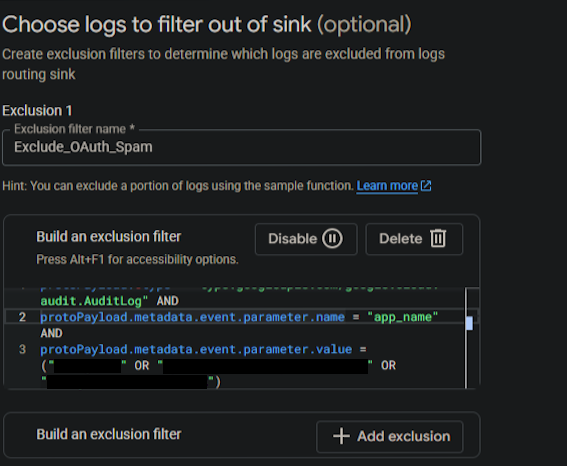
For example, with my Google Cloud log optimization, I grouped my logs by the type of event, and saw a huge percentage of them were not even user sign-ins, but calls to the OAuth API. I decided to group further by the individual applications making these API calls and discovered that 95% of all of our traffic from the entire source was from 3 applications, and these applications were not even relevant to our security logs. In the end, I applied my in-source exclusion filter for the 3 applications, and with 30 minutes of work, successfully reduced ingestion from that source by 95%. We still wanted to keep other OAuth API calls though, to watch for anomalous behavior, but removing the 3 top apps had no impact on that use case, so we were able to remove them with zero negative impact.
Optimization Techniques
Now that we have our reasons for optimizing our ingestion, how do you actually go about doing it? Below I will discuss a few of the common methods for tuning your SIEM ingestion for alignment with your requirements. Again, this list is non-exhaustive, so get creative!
We need to focus on optimization that occurs before you accrue a cost, so all of these techniques must happen before the data reaches the cloud of your SIEM, or the storage that generates a cost.
In-Source Filtration
One of the most immediate and practical methods of optimizing your ingestion is to alter the actual shipping of the logs at the source.
When you set up log sources for a SIEM, the source may support filtration in some way. This could be by a literal filter for specific fields or string patterns, it could be for disabling log shipping on policies (common for firewalls), selecting specific fields you want to include in the data you ship, or even by changing the log levels to be less-verbose so you send less data per event.
Filtering logs using fields or string patterns is something that Google Cloud Platform supports for their Pub/Sub topic log shipping. You can configure your sink to only collect logs from specific sources, or add an exclusion filter to drop logs that match a specific criteria. We actually did this for our Google log shipping and reduced overall traffic from the source by 95% by excluding logs from 3 just API sources for well-known OAuth traffic. This change proved to have zero impact on the quality of the logs we received, but reduced our traffic volume significantly, and with extremely little effort involved in doing so.
Some sources may allow per-policy log settings if you ship logs by policy hits. For instance, many firewalls allow you to enable or disable logs for security policies, meaning you can break out policies for traffic you have no use for, then disable log shipping for those policies. Contrary to what people may say, shoving every event you possibly can into your SIEM is not the best strategy just for the sake of “visibility”.
Post-Source Filtration
If you cannot configure your log shipping to a satisfactory level in the log source itself, third-party systems do exist for intercepting logs at the pre-ingest stage, and filtering them there. One of the most well-known options for this as of writing this article is Cribl. Cribl allows you to ship logs to their system, parse to a level that allows you to manipulate or filter your logs as needed, then only send what you want on to the final SIEM destination.
This approach does incur its own cost generally though, as Cribl has a free tier, but it is only good for so much data before you hit the limit and have to pay. Determining whether or not it costs less to do this approach, versus just ingest all the data is an important consideration for this method.
There is also the option of custom-making your own interceptor and filter, and while not a terrible idea, this is not practical for smaller organizations, and for larger organizations may just prove to be a bottleneck in your throughput for your logs, causing delays. Though this can be potentially cheaper than paying for a third-party filtration system.
Parser Field Dropping
If you are using a SIEM platform that does not consider data at the parser to be “ingested”, then you may want to leverage this method. However, many SIEMs charge for data that reaches your parser at all, making this an option that will not work for everyone.
When designing a parser, you can drop unneeded or unused fields in your data, which can significantly lower the size of the individual events. However, some SIEM systems store the data by the original event sent, and simply parse at query-time, making this option not practical. Make sure to understand your SIEM pricing factors and how the back-end of the storage works if you want to implement something like this.

If you’re interested in learning how to design a parser, including dropping fields, go check out my article on Building Custom Parsers for CrowdStrike Next-Gen SIEM. The article does cover the CrowdStrike NG-SIEM however, which does not support dropping fields in the parser to reduce ingest, so keep that in mind! Once an event reaches the parser at all, CrowdStrike considers it ingested.
Data Offloading
One option that is complex, but can be desirable is offloading data from your SIEM that you may need, but may not fit well with the rest of your SIEM data use cases. For example, if you have a system that generates 50 Gb a day of logs and you only use it for debugging, no threat hunting, no correlations, but you still want to have access to those logs, your best choice is not to put it in your main SIEM, but a separate data storage system.
This is where cold storage can come into play, or even a secondary SIEM. Graylog is a common one to use for this use case, as you only pay for the storage of the data if you host it yourself, requiring little ongoing cost, and generally much smaller upfront cost. One of the main downsides to this method though, is the complexity and time requirement of setting up your own system, or the technical debt of having a second storage system for reviewing the offloaded logs.
Outlook
SIEM platforms are a large part of security operations, and as such, can also be a major source of cost and headache. By intelligently reviewing your system, you can efficiently and effectively optimize your SIEM systems without compromising on the utility the platform provides.
SIEM optimization is something that looks different for every organization, so get creative, explore your options, and make sure you report to your bosses when you save them money and storage, because it always looks good on you!
Hope this information was helpful, thank you as always for reading, and go tune your SIEM!
Leave a Reply